ConcertoGRC Platform Overview
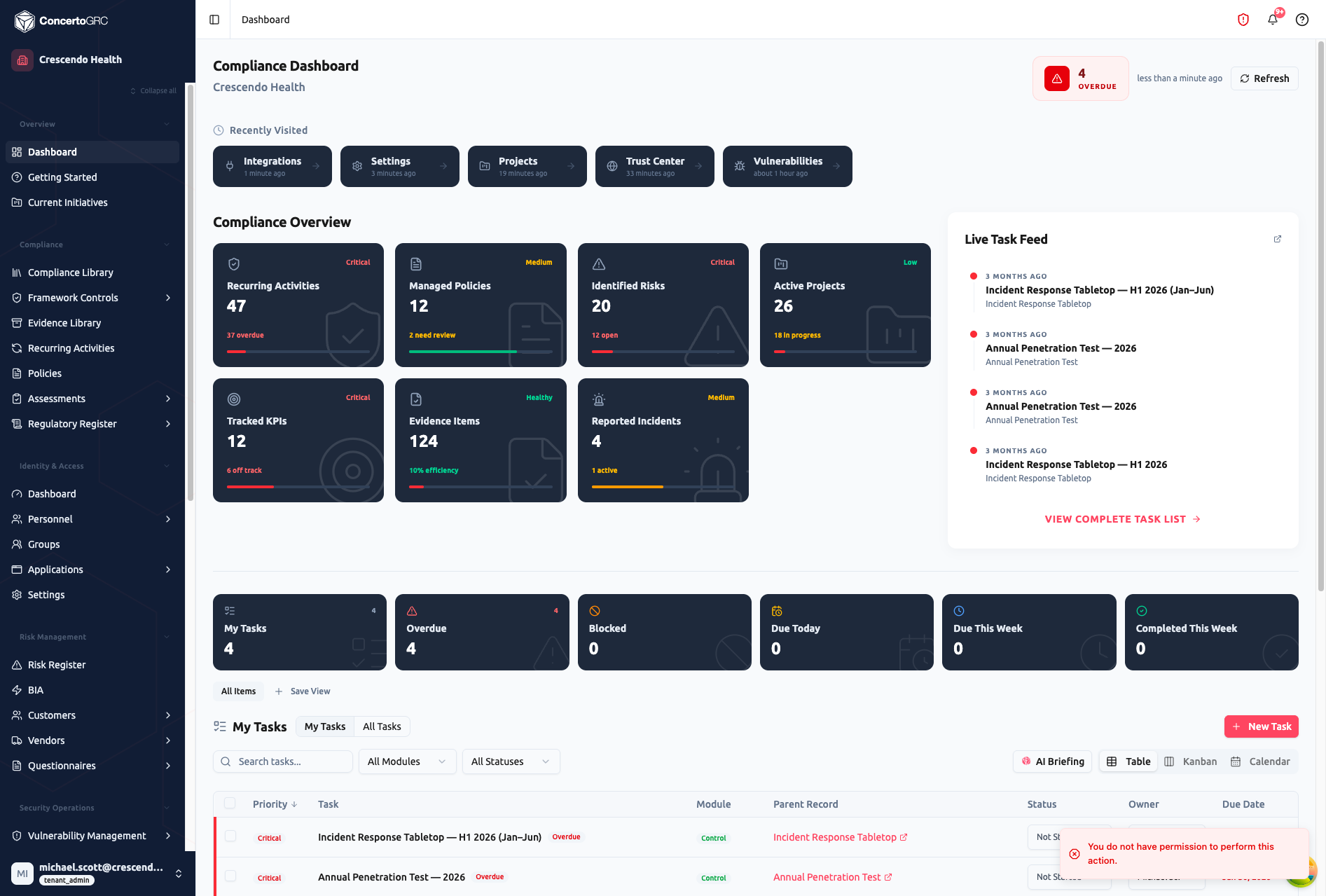
ConcertoGRC is a Governance, Risk, and Compliance (GRC) platform that enables organizations to manage their compliance programs across multiple frameworks from a single interface. Built for teams managing SOC 2, ISO 27001, ISO 42001, PCI DSS, and HIPAA, ConcertoGRC centralizes compliance operations, automates evidence collection, and provides real-time visibility into your security posture.
Supported Frameworks
- SOC 2 -- Trust Services Criteria (Type I and Type II)
- ISO 27001 -- Information Security Management Systems
- ISO 42001 -- Artificial Intelligence Management Systems
- PCI DSS 4.0 -- Payment Card Industry Data Security Standard
- HIPAA -- Health Insurance Portability and Accountability Act
- GDPR -- General Data Protection Regulation
Additional frameworks can be deployed from the Master Framework Library, including ISO 27701, ISO 22301, NIST CSF, NIST 800-53, NIST AI RMF, CIS Controls, and CMMC.
Platform Modules
ConcertoGRC organizes compliance work into the following module groups:
Compliance
Manage your framework controls, collect and track evidence, run recurring compliance activities, and manage assessments.
- Framework Controls -- Map controls to frameworks, track implementation status
- Evidence Library -- Upload and manage compliance evidence with validity tracking
- Recurring Activities -- Schedule and track recurring compliance tasks
- Policies -- Draft, review, and publish organizational policies
- Assessments -- Internal assessments, engagements, and audit firm management
- Regulatory Register -- Track regulatory updates and obligations
Risk Management
Identify, score, and treat organizational risks. Manage third-party vendor relationships, customer commitments, and questionnaires.
- Risk Register -- Identify and score risks with treatment plans
- Vendor Management -- Assess vendor risk, track attestations, manage BAAs
- Customer Commitments -- Track security commitments to customers
- Questionnaires -- Manage outbound and inbound security questionnaires
Identity & Access
Maintain a directory of personnel, applications, and access grants. Run periodic access reviews and manage the employee lifecycle.
- Personnel Directory -- Employee records, org chart, department management
- Applications -- Application inventory with access levels and data classification
- Access Reviews -- Periodic review workflows with OCR-based user extraction
Security Operations
Monitor vulnerabilities, manage endpoints, run phishing simulations, conduct training, and respond to incidents.
- Vulnerability Management -- Track findings from integrations and scans
- Vulnerability Scanning -- Managed scanning with HostedScan integration
- Endpoint Management -- MDM-integrated device compliance monitoring
- Incident Response -- Track and respond to security incidents
- Training -- Security awareness training campaigns
- Phishing Simulation -- Run simulated phishing campaigns
- Tabletop Exercises -- Facilitated scenario-based exercises
- Infrastructure -- Cloud infrastructure inventory and security posture
Reporting
Track KPIs, generate reports, and document compliance meetings.
- KPIs -- Key performance indicators across compliance domains
- Reports -- Generate and schedule compliance reports
- Meetings -- Compliance meeting agendas and transcripts
Administration
Configure your organization's settings, manage users, and connect integrations.
- Users & Roles -- Manage team members and their permissions
- Settings -- Organization profile, integrations, SSO, AI, and import/export
- AI Configuration -- View AI model settings and prompt templates
Key Concepts
Multi-Tenancy
Each organization operates in its own isolated tenant. All data is scoped to your organization -- you will never see another tenant's data.
Autosave
All field edits save automatically. Dropdowns save immediately on selection. Text fields save when you click away (on blur). You'll see a subtle confirmation when changes are saved.
Sidecar Pattern
Records open in a detail panel (sidecar) on the right side of the screen rather than navigating to a new page. This lets you browse your list while viewing details without losing your place.
Products
Many modules support per-product scoping. If your organization ships multiple products, you can track compliance status independently for each product while sharing common controls.
Getting Help
If you need assistance, submit a support ticket through Administration > Support Tickets in the platform sidebar.