Regulatory Register
The Regulatory Register tracks which regulations apply to your organization, monitors their compliance status, schedules periodic reviews, and surfaces relevant regulatory updates. Regulations are deployed from a platform-level catalog and tracked per tenant with compliance status, review frequency, assignee, and notes.
Overview
Access from Compliance > Regulatory Register in the sidebar. The module has two sub-sections:
- Register -- Your tracked regulations and compliance posture
- Updates -- Regulatory change alerts filtered by your organization's profile
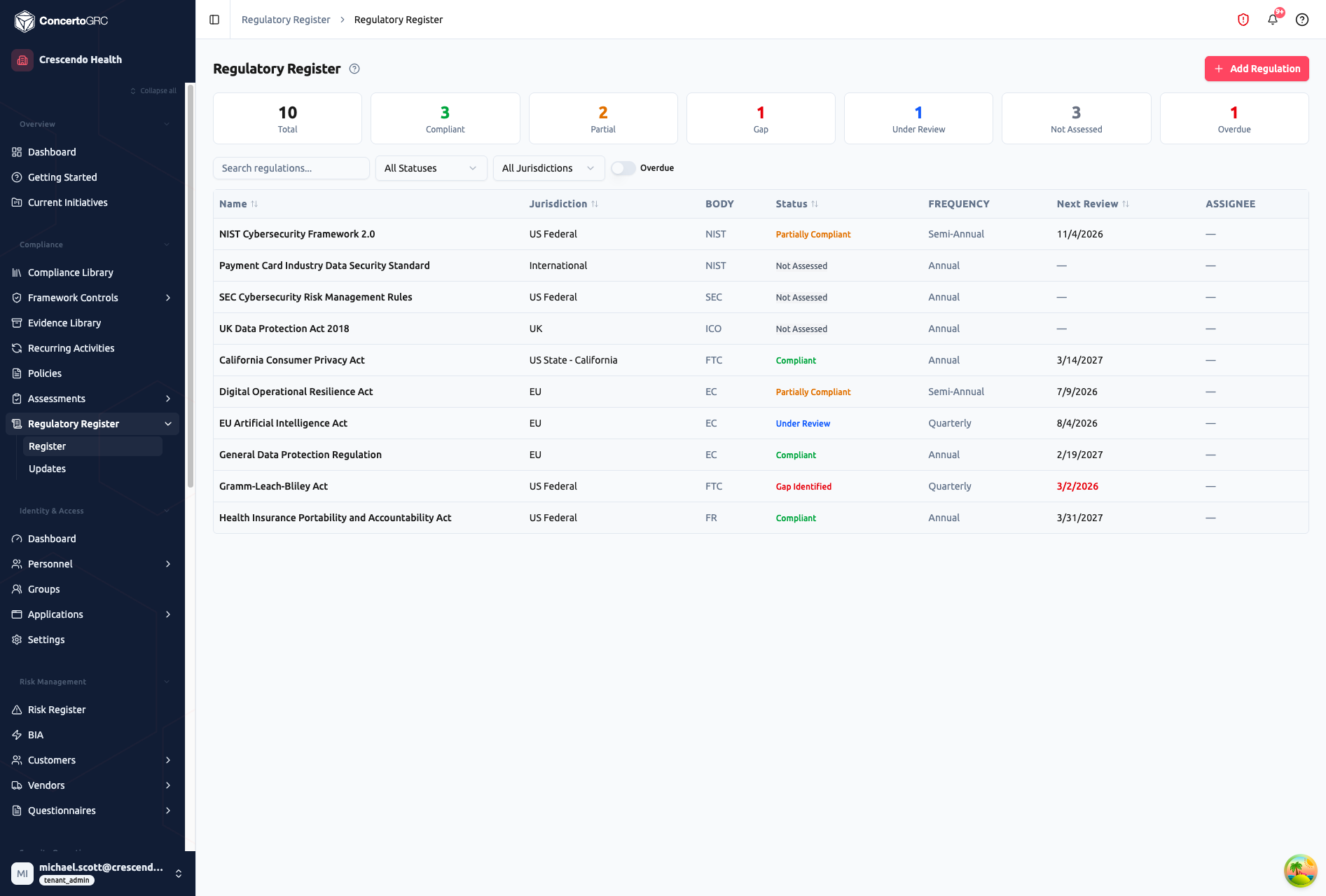
Summary Statistics
The top bar shows live counts by compliance status:
| Card | Description |
|---|---|
| Total | All tracked regulations |
| Compliant | Fully compliant (green) |
| Partial | Partially compliant (orange) |
| Gap | Gap identified (red) |
| Under Review | Currently under review (blue) |
| Not Assessed | Not yet evaluated (gray) |
| Overdue | Past next review due date (red) |
Click any stat card to filter the table to that status.
Regulation Table
| Column | Description |
|---|---|
| Name | Regulation name (click row to open detail sidecar) |
| Jurisdiction | Geographic scope (e.g., US Federal, EU, UK, International) |
| Body | Regulatory body abbreviation (e.g., NIST, SEC, EC, FTC) |
| Status | Color-coded compliance status |
| Frequency | Review cadence (Monthly, Quarterly, Semi-Annual, Annual) |
| Next Review | Next review due date -- shown in red if overdue |
| Assignee | Assigned reviewer |
Use the search bar and dropdown filters to find regulations by name, compliance status, jurisdiction, or assignee. Toggle Overdue to show only regulations past their review due date.
Adding Regulations
Click + Add Regulation to browse the platform regulation catalog. The catalog is curated at the platform level by operators and includes regulations from major regulatory bodies.
Select one or more regulations and click Deploy to add them to your organization's register. Deployed regulations start with a compliance status of Not Assessed and a review frequency of Annual.
Duplicate deployments are automatically skipped -- the same regulation cannot be added twice.
Regulation Detail
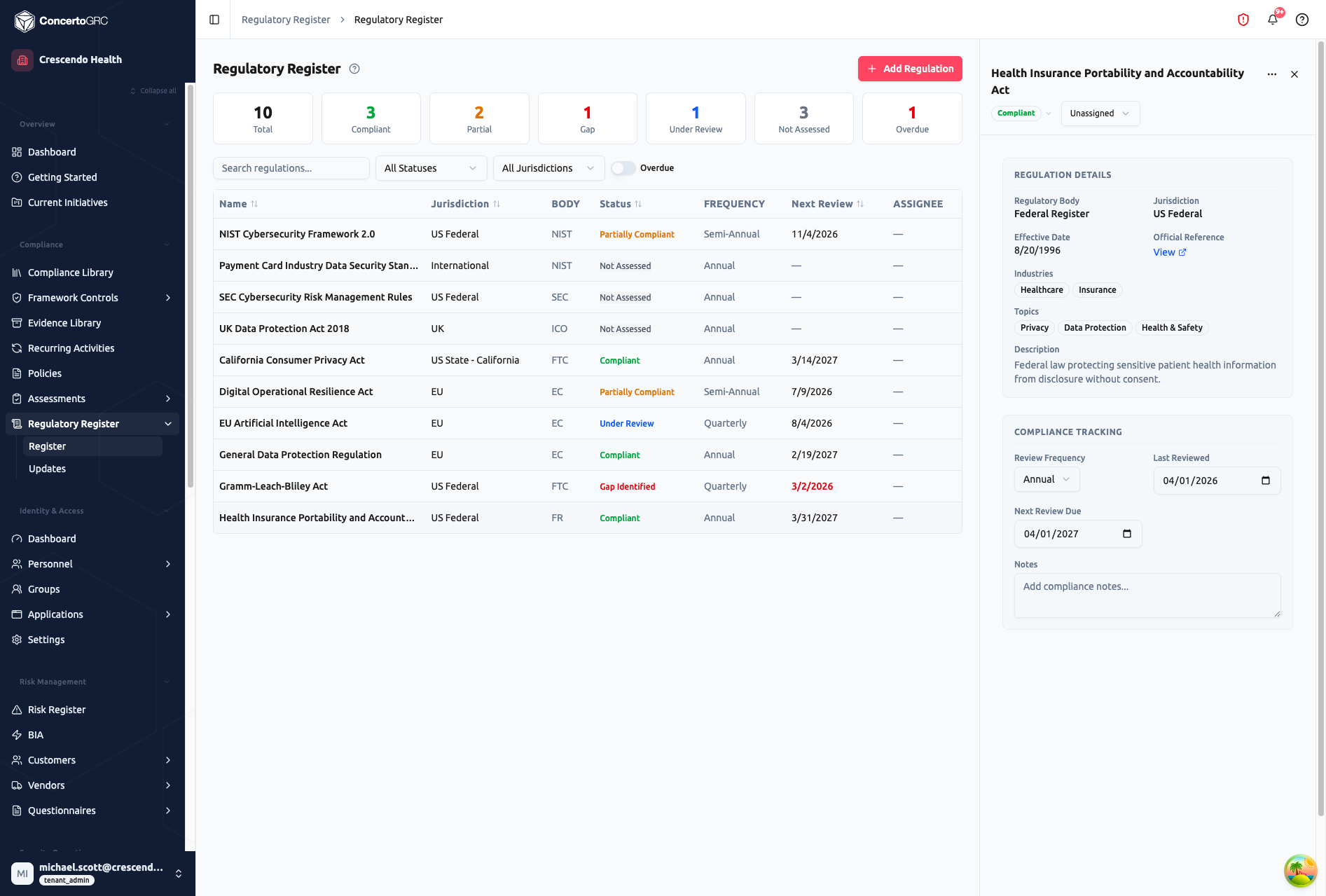
Click any regulation row to open the detail sidecar. All fields autosave on change.
Header
- Title -- Regulation name
- Compliance Status -- Dropdown badge (see statuses below)
- Assignee -- Dropdown to assign a reviewer from your team
Regulation Details
| Field | Description |
|---|---|
| Regulatory Body | Issuing authority name |
| Jurisdiction | Geographic scope |
| Effective Date | When the regulation took effect |
| Official Reference | Link to the official regulation text |
| Industries | Industry tags (e.g., Healthcare, Financial Services, Technology) |
| Topics | Topic tags (e.g., Privacy, Cybersecurity, AI, Data Protection) |
| Description | Summary of what the regulation covers |
Compliance Tracking
| Field | Description |
|---|---|
| Review Frequency | How often to reassess -- Monthly, Quarterly, Semi-Annual, or Annual |
| Last Reviewed | Date of the most recent compliance review |
| Next Review Due | When the next review is scheduled -- shown in red when overdue |
| Notes | Free-text compliance notes |
Compliance Statuses
| Status | Color | Description |
|---|---|---|
| Compliant | Green | Fully meeting all requirements |
| Partially Compliant | Orange | Some requirements met, gaps remain |
| Gap Identified | Red | Compliance gaps identified, remediation needed |
| Under Review | Blue | Compliance status currently being evaluated |
| Not Assessed | Gray | Haven't evaluated compliance yet |
| N/A | Gray | Regulation doesn't apply to this organization |
Bulk Status Update
Select multiple regulations and update their compliance status in one action.
Review Scheduling
Each regulation has a review frequency that determines how often compliance should be reassessed:
| Frequency | Cadence |
|---|---|
| Monthly | Every month |
| Quarterly | Every 3 months |
| Semi-Annual | Every 6 months |
| Annual | Every 12 months |
When the Next Review Due date passes, the regulation appears in the Overdue count on the summary cards and the date turns red in the table.
Regulatory Updates
Access from Compliance > Regulatory Register > Updates in the sidebar.
The Updates feed surfaces regulatory changes relevant to your organization based on your configured profile. Updates are ingested from platform-level feed sources (RSS feeds, REST APIs), processed by AI for classification and summarization, and filtered to match your profile.
Configuring Your Profile
Click Configure Profile to set your organization's regulatory interests:
| Field | Description |
|---|---|
| Industries | Which industries apply (e.g., Healthcare, Financial Services, Technology) |
| Jurisdictions | Which geographic regions to monitor (e.g., US Federal, EU, UK) |
| Topics | Which regulatory topics to track (e.g., Privacy, Cybersecurity, AI) |
| Keywords | Custom keywords for additional matching |
Updates are matched against your profile so you only see relevant changes.
Alert Feed
Each regulatory alert shows the update title, AI-generated summary, impact level, source, publication date, and relevant tags (industries, jurisdictions, topics). Alerts have a status workflow:
| Status | Description |
|---|---|
| Unread | New alert, not yet reviewed |
| Read | Alert has been viewed |
| Starred | Flagged for follow-up |
| Dismissed | No action needed |
Use Mark all read to clear unread alerts in bulk, or use the bulk status update for targeted changes.
Impact Levels
| Level | Color | Description |
|---|---|---|
| Critical | Red | Immediate action -- directly affects current compliance |
| High | Orange | Action needed soon -- significant regulatory change |
| Medium | Amber | Plan to address -- moderate impact |
| Low | Blue | Low priority -- minor change |
| Info | Gray | Awareness only -- informational |
Feed Sources
Regulatory updates are ingested from platform-managed feed sources. Tenants can enable or disable individual feed sources via Sources to control which regulatory bodies they monitor.
| Source Type | Description |
|---|---|
| RSS | Automated monitoring of regulatory body publications |
| REST API | Programmatic feed ingestion from compliance services |
| JSON File | Structured regulatory data files |
AI Processing
Ingested updates are processed by AI to generate:
- Summary -- Concise plain-language summary of the regulatory change
- Classification -- Automatic tagging by industry, jurisdiction, topic, and impact level
- Affected Regulations -- Links to regulations in your register that may be impacted
Platform Catalog
The regulation catalog is maintained at the platform level by operators. Each regulation in the catalog includes:
| Field | Description |
|---|---|
| Name | Official regulation name |
| Short Name | Common abbreviation (e.g., HIPAA, GDPR, CCPA) |
| Regulatory Body | Issuing authority |
| Jurisdiction | Geographic scope |
| Industries | Applicable industry tags |
| Topics | Regulatory topic tags |
| Effective Date | When the regulation took effect |
| Reference URL | Link to official text |
| Status | Active, Proposed, Repealed, or Superseded |
Tenants browse the catalog and deploy applicable regulations to their register. The catalog follows the platform's standard "curate at platform level, deploy at tenant level" pattern.