Risk Register
The Risk Register is your central inventory of organizational risks. Use it to identify risks, score them for severity, assign treatment plans, link them to controls and vendors, and track remediation progress.
Overview
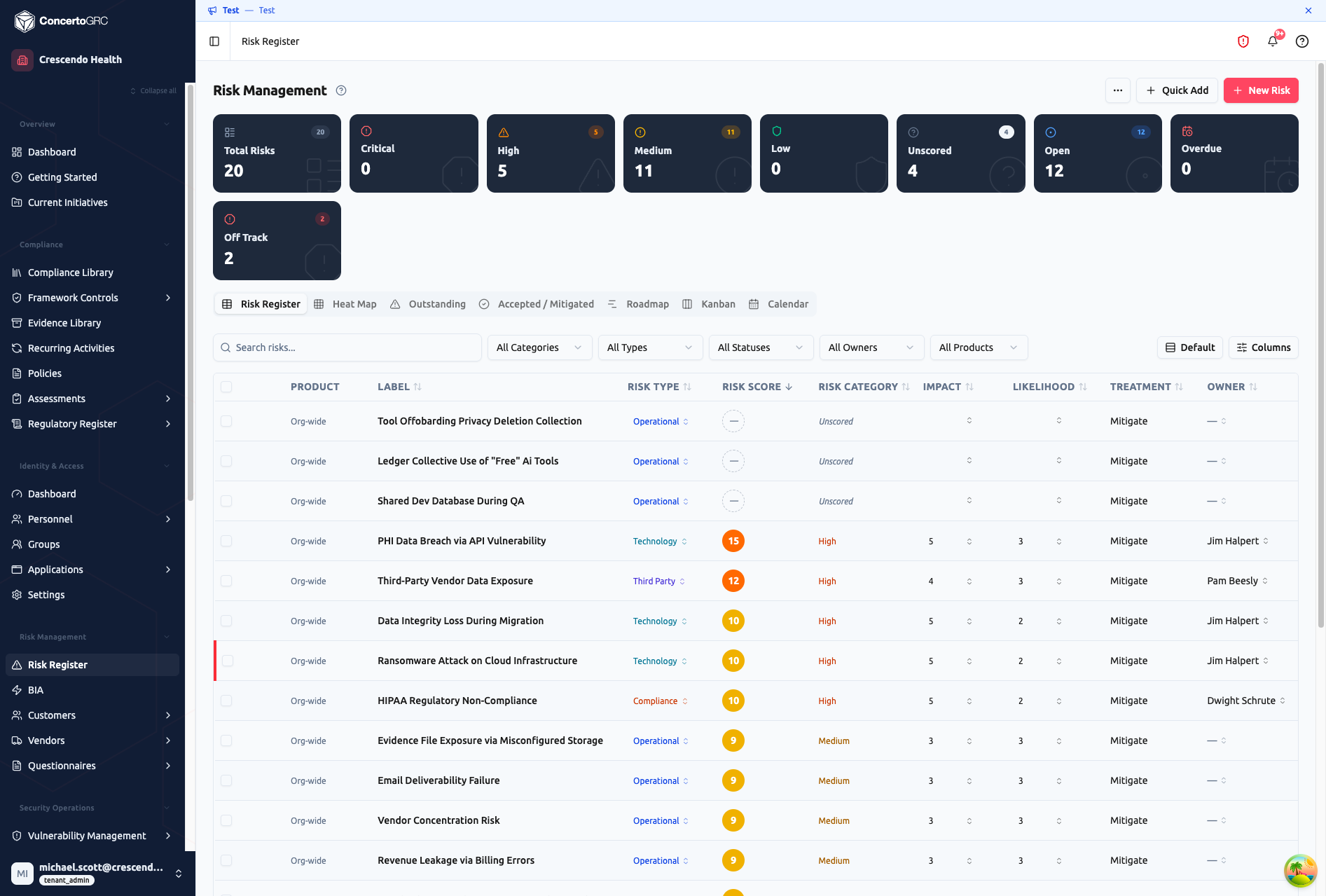
Access from Risk Management > Risk Register in the sidebar. The top bar shows live counts by risk category (Critical, High, Medium, Low, Unscored) and status (Open, Off Track, Overdue). Click any stat to filter the table to that subset.
Creating Risks
Quick Add
Click + Quick Add in the toolbar to create a risk with just a name. The risk is created unscored -- open the sidecar to add scoring, type, and treatment details. Best for capturing risks quickly during a brainstorm or meeting.
New Risk Wizard
Click + New Risk for a guided 3-step wizard:
- Identification -- Name, description, risk type, product scope, threat/vulnerability
- Assessment -- Impact (1–5) and likelihood (1–5) with auto-calculated risk score and category
- Treatment -- Treatment plan, implementation notes, roadblocks, owner, due date, status
A summary screen shows all fields before creation.
AI Risk Orchestrator
The Risk Orchestrator uses AI to generate a tailored risk register based on your organization's profile. It operates in two modes:
Incremental mode (when risks already exist) -- Adds new risks to complement your existing register. Enter a focus area like "AWS migration risks" or "PHI handling risks" and the AI generates risks that fill gaps.
Full mode (starting from scratch) -- A multi-step questionnaire collects your organization profile:
- Organization Profile -- Industry, company size, data types handled, regulatory frameworks
- Risk Landscape -- Risk categories to focus on, critical assets, third-party dependencies, geographic scope
- Threat Context -- Recent incidents, known vulnerabilities, additional context
After generation, you review each risk card-by-card: accept, skip, or edit fields (name, description, scores, treatment plan) before committing. Only accepted risks are created.
Working with Risks
Inline Editing
Click any field directly in the table to edit it -- risk name, type, impact, likelihood, owner, status, and treatment all autosave on change. No save button needed.
Risk Detail Panel
Click a row to open the detail sidecar with five tabs:
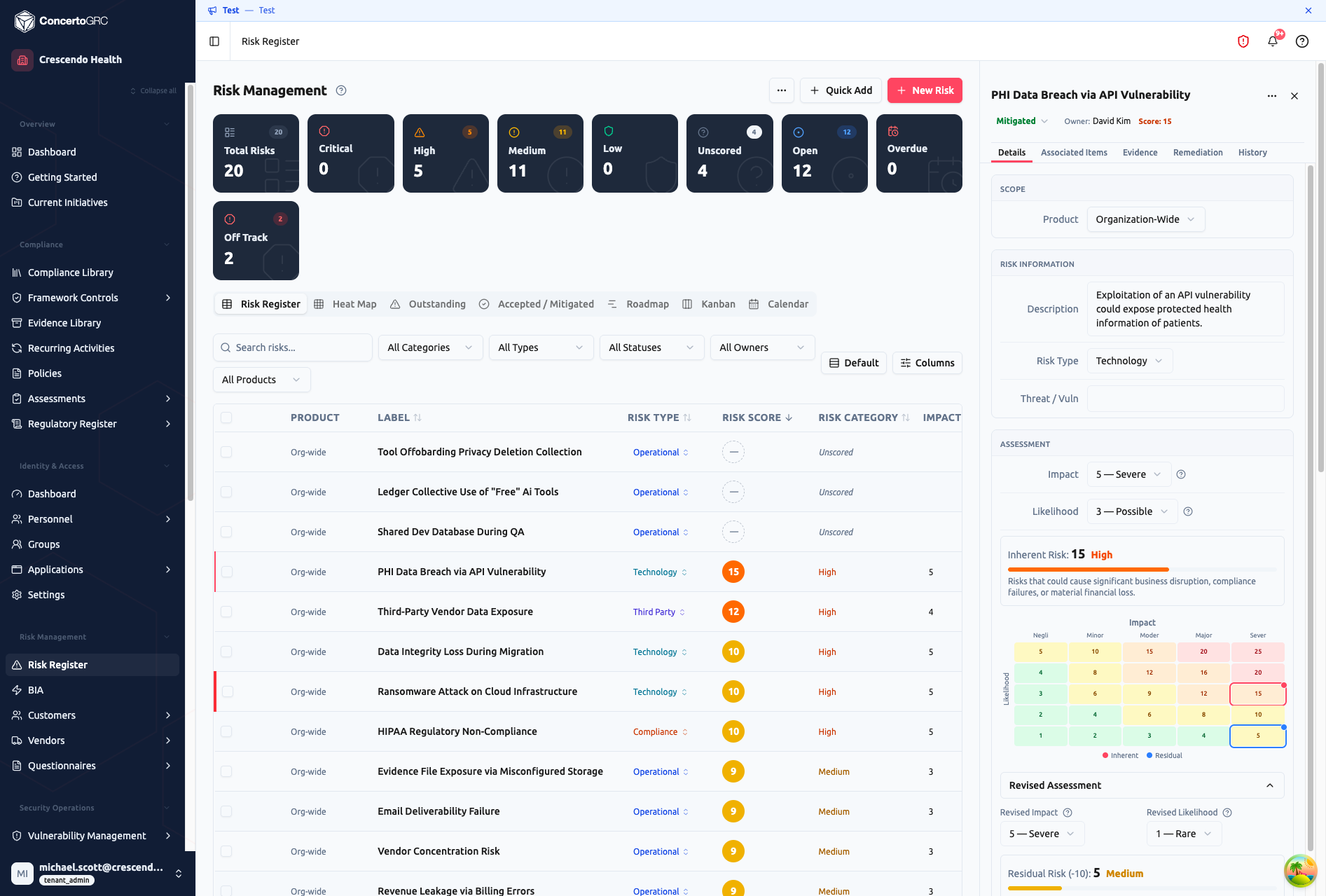
Details
- Scope -- Product assignment (organization-wide or product-specific)
- Risk Information -- Description, risk type, threat/vulnerability
- Assessment -- Impact and likelihood dropdowns with an interactive 5×5 risk matrix. The matrix marks both inherent (red) and residual (blue) positions so you can see treatment effectiveness at a glance
- Revised Assessment -- Collapsible section for residual risk scores after controls are applied
- Custom Fields -- Tenant-specific fields added via Settings
Generate Risk Profile -- Click the AI button to have Claude analyze the risk name and generate a complete profile: description, type, threat details, suggested impact/likelihood scores, and remediation notes. Review each suggested field and accept individually or all at once.
Associated Items
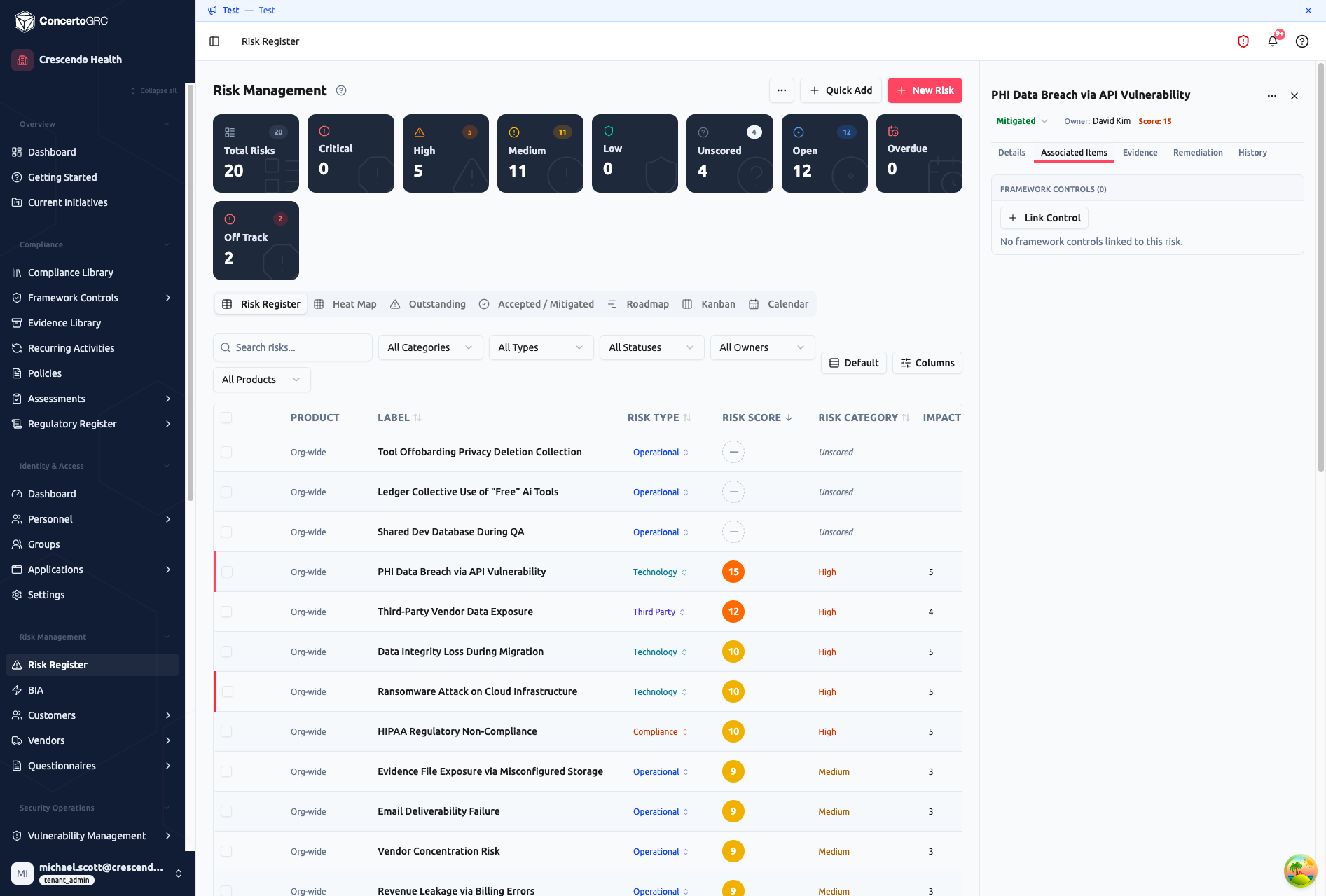
Link this risk to other records across the platform:
- Framework Controls -- Connect risks to the controls that mitigate them
- BIA Processes -- Link to business impact assessment processes
- KPIs -- Track metrics that measure this risk's exposure
- Vendors -- Associate third-party vendors related to the risk
Click + Link Control to search and attach framework controls. Links are bidirectional -- the control's detail panel will also show this risk.
Evidence
Upload supporting documents for the risk -- screenshots, audit reports, policy documents, or any file that provides context for the risk assessment.
Remediation
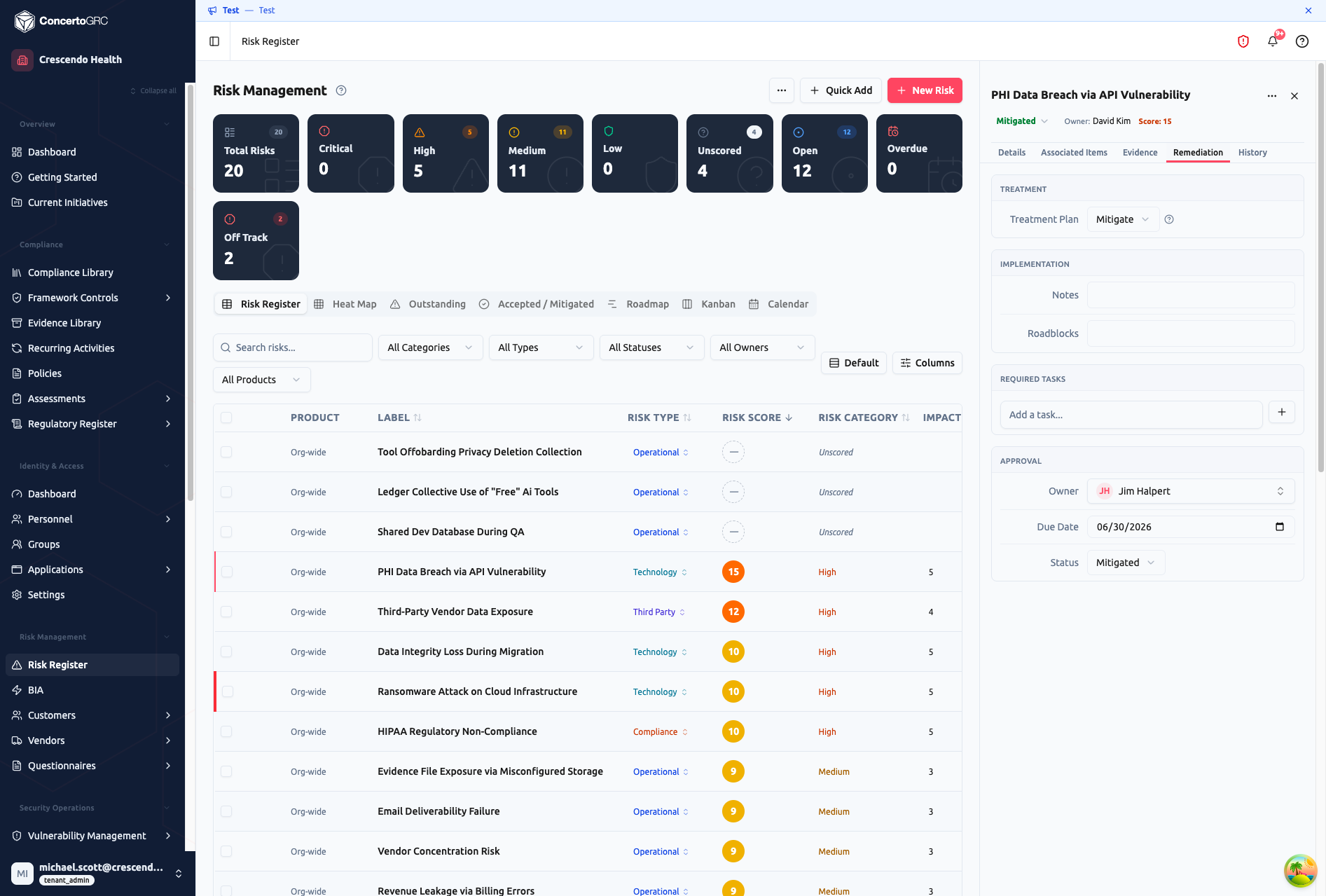
- Treatment -- Select a treatment plan (Mitigate, Accept, Transfer, Avoid)
- Implementation -- Notes on how the treatment is being implemented, plus any roadblocks
- Required Tasks -- Create and track tasks needed to remediate the risk. Tasks appear in the global task list and assignee dashboards
- Approval -- Assign an owner, set a due date, and track status
History
Audit trail of changes to the risk record.
Bulk Actions
Select multiple risks using the checkboxes in the first column. A floating toolbar appears with bulk operations:
- Change status -- Move all selected risks to a new status
- Change risk type -- Reassign type across selected risks
- Change treatment plan -- Bulk-update treatment strategy
- Delete -- Remove selected risks (with confirmation)
Views
Table
The default view. Sort by any column, filter by category, type, status, owner, or product. Use the Columns button to show/hide columns. Off-track risks display a red left border.
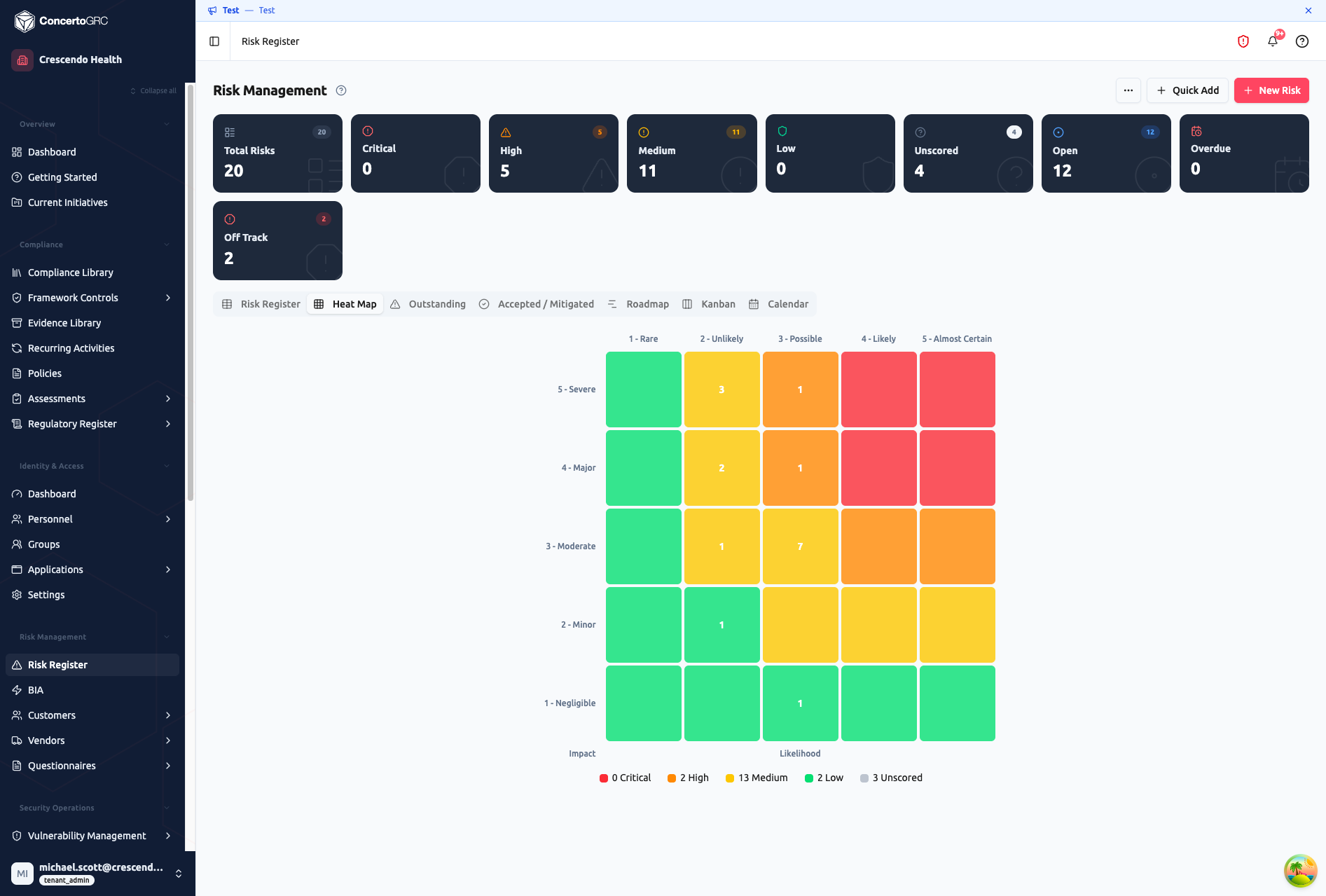
Heat Map
A 5×5 grid plotting risks by Impact (Y-axis) and Likelihood (X-axis). Each cell is color-coded: green (Low), yellow (Medium), orange (High), red (Critical). The number in each cell shows how many risks fall at that intersection. Click a cell to see those risks.
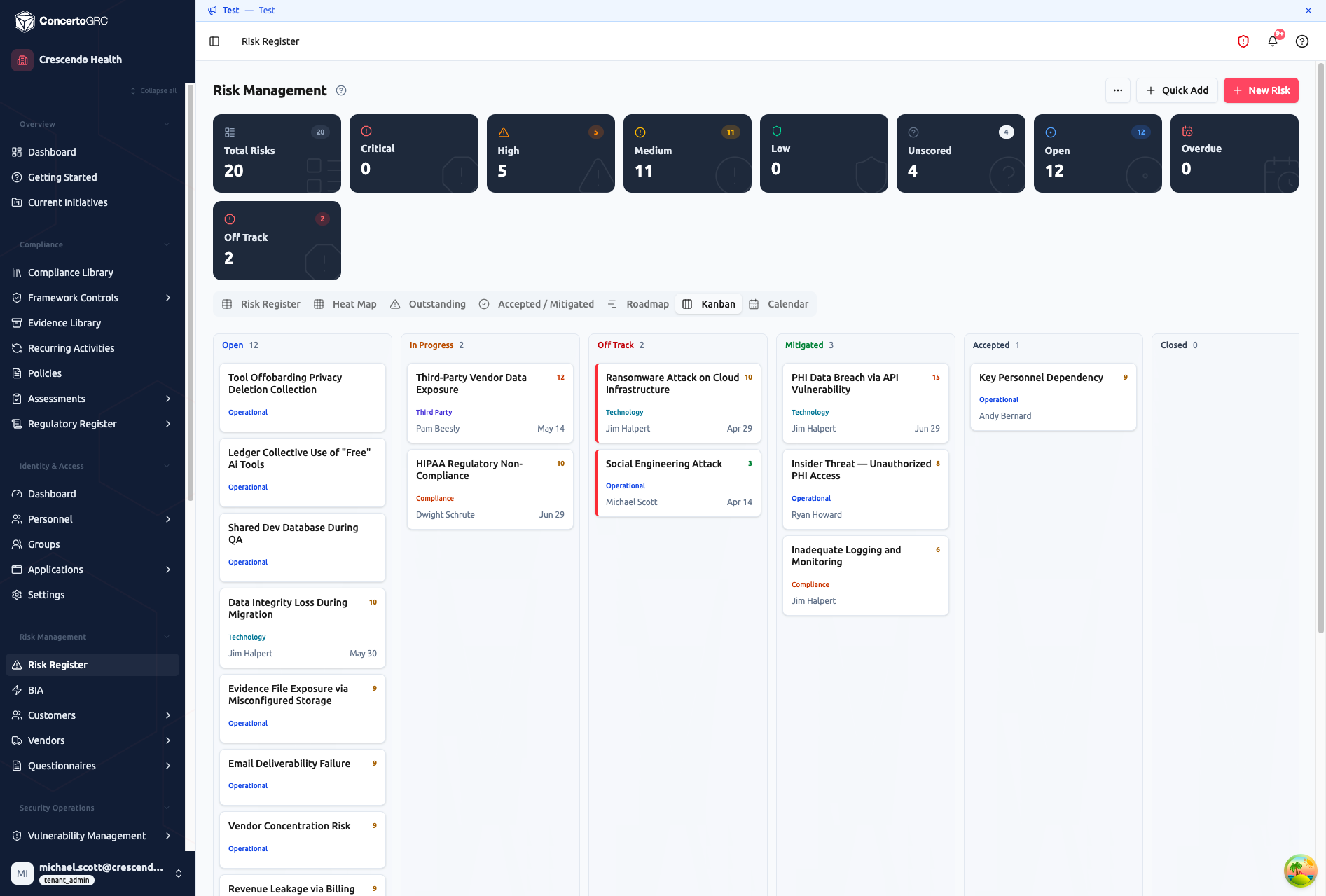
Kanban
Status-based columns (Open, In Progress, Off Track, Mitigated, Accepted, Closed) with drag-and-drop. Drag a card between columns to change its status. Each card shows the risk name, type, score badge, owner, and due date.
Outstanding
Filtered table showing only Open and In Progress risks, sorted by score (highest first). Overdue risks are highlighted. Use this view during risk review meetings to focus on active items.
Accepted / Mitigated
Filtered view of treated risks -- those with Mitigated or Accepted status. Useful for auditors reviewing your risk treatment history.
Roadmap
A 12-month Gantt-style timeline for risks with due dates. Bars are color-coded by risk category. Helps visualize when treatments are scheduled and identify clustering.
Calendar
Monthly calendar view showing risks plotted by due date. Drag a risk to a new date to reschedule.
Risk Scoring
Risk Score = Impact × Likelihood (range: 1–25)
Each risk has two sets of scores:
- Inherent risk -- The raw risk before any controls or treatments
- Residual risk -- The remaining risk after controls are in place
The score maps to a risk category:
| Score Range | Category | Urgency |
|---|---|---|
| 20–25 | Critical | Immediate action required |
| 12–19 | High | Priority treatment needed |
| 5–11 | Medium | Monitor and plan treatment |
| 1–4 | Low | Accept or monitor |
Impact Scale
| Score | Label | Description |
|---|---|---|
| 1 | Negligible | Minimal business impact |
| 2 | Minor | Limited impact, easily recoverable |
| 3 | Moderate | Noticeable impact, requires effort to recover |
| 4 | Major | Significant impact on operations or reputation |
| 5 | Severe | Critical impact, potential existential threat |
Likelihood Scale
| Score | Label | Description |
|---|---|---|
| 1 | Rare | Unlikely to occur |
| 2 | Unlikely | Could occur but not expected |
| 3 | Possible | Might occur during the assessment period |
| 4 | Likely | Expected to occur |
| 5 | Almost Certain | Expected to occur multiple times |
Administrators can customize the impact/likelihood scale labels, definitions, and risk level thresholds via the scoring settings (gear icon in the toolbar).
Risk Types
- Strategic
- Operational
- Financial
- Compliance
- Reputational
- Technology
- Third-Party
Treatment Plans
| Plan | When to use |
|---|---|
| Mitigate | Implement controls to reduce impact or likelihood |
| Accept | Risk is within tolerance -- acknowledge without further action |
| Transfer | Shift risk to a third party (insurance, vendor contract) |
| Avoid | Eliminate the activity that creates the risk |
Status Lifecycle
| Status | Description |
|---|---|
| Open | Identified, not yet being treated |
| In Progress | Treatment plan is being implemented |
| Off Track | Treatment is behind schedule (auto-flagged when past due date) |
| Mitigated | Controls in place, residual risk at target level |
| Accepted | Formally accepted without further treatment |
| Closed | Risk no longer applies |
Import & Export
Import
Bulk-import risks via CSV. Click Import in the toolbar and map columns to fields. Only Risk Name is required -- all other fields are optional.
| Column | Required | Accepted Values |
|---|---|---|
| Risk Name | ✓ | Free text |
| Description | -- | Free text |
| Threat/Vulnerability | -- | Free text |
| Risk Type | -- | STRATEGIC, OPERATIONAL, FINANCIAL, COMPLIANCE, REPUTATIONAL, TECHNOLOGY, THIRD_PARTY |
| Initial Impact | -- | 1–5 |
| Initial Likelihood | -- | 1–5 |
| Revised Impact | -- | 1–5 |
| Revised Likelihood | -- | 1–5 |
| Treatment Strategy | -- | ACCEPT, MITIGATE, TRANSFER, AVOID |
| Implementation Notes | -- | Free text |
| Roadblocks | -- | Free text |
| Owner | -- | User name or email |
| Status | -- | OPEN, IN_PROGRESS, OFF_TRACK, MITIGATED, CLOSED, ACCEPTED |
Impact and likelihood default to 3 (Moderate/Possible) if not provided.
Export
Click Export to download all risks as CSV, including scores, categories, owners, and status.