AI Configuration
ConcertoGRC embeds AI across the platform for analysis, generation, mapping, and orchestration tasks. The AI section in Administration > Settings > AI lets you view feature configurations, model assignments, prompt templates, and inference settings.
Overview
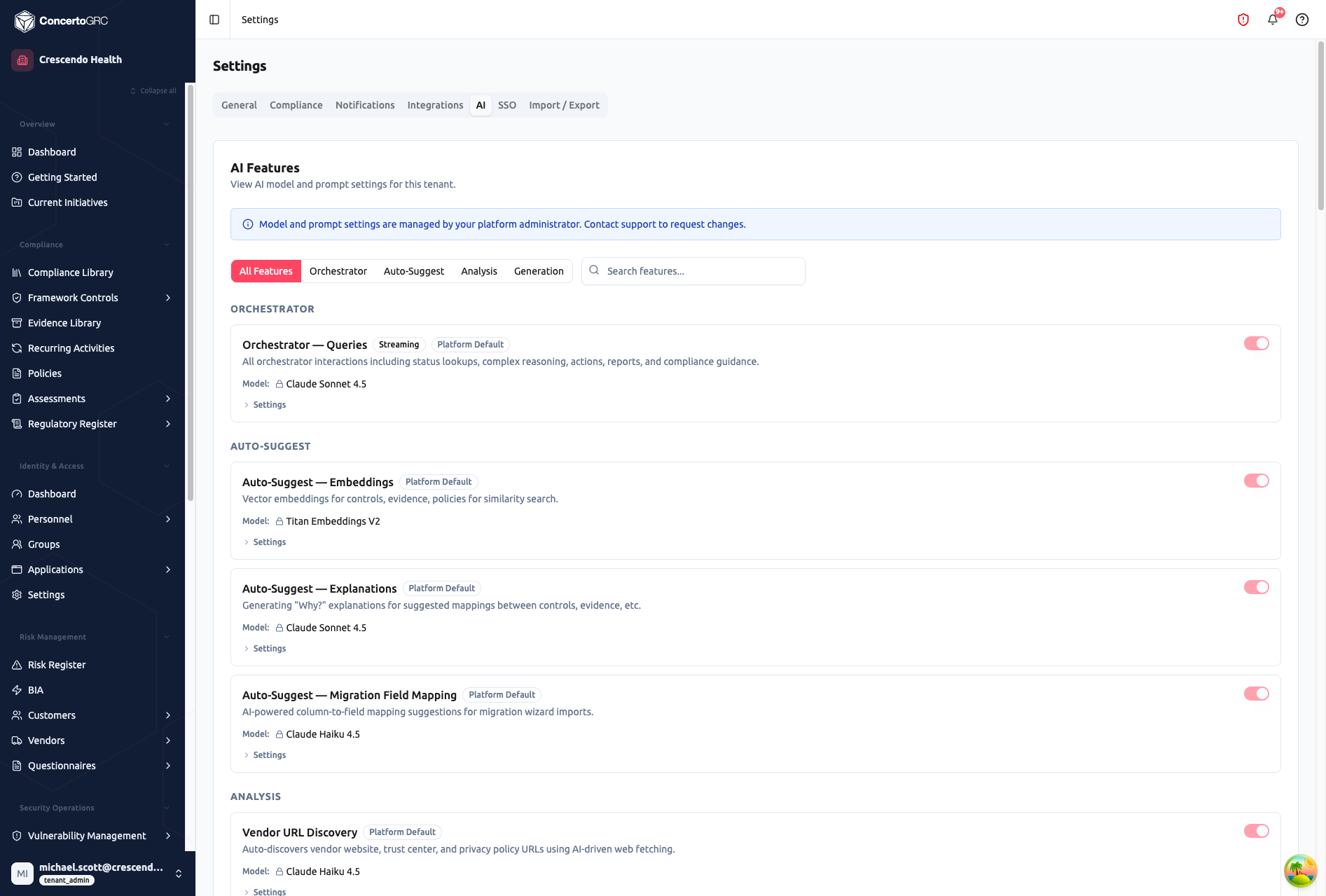
Features are organized into four categories, each filterable from the tab bar. A search field helps locate specific features. Each feature card shows:
- Feature name and description
- Badges -- Streaming (real-time output), Platform Default (inherited from platform config)
- Model -- The AI model assigned to this feature
- Enable/disable toggle -- Controls whether the feature is active
- Settings -- Inference parameters (max tokens, temperature)
- Prompt -- Editable prompt template (available on features that use prompt templates)
AI configuration is managed exclusively by Concerto platform operators (Super Admin and Team roles). Tenant administrators can view feature configurations but cannot modify models, prompts, or inference settings. Contact your Concerto account manager to request changes.
Feature Categories
Orchestrator
Core AI interactions powering the platform's conversational capabilities.
| Feature | Model | Description |
|---|---|---|
| Orchestrator -- Queries | Claude Sonnet 4.5 | Status lookups, complex reasoning, actions, reports, and compliance guidance (streaming) |
Auto-Suggest
Automated suggestions and intelligent field mapping powered by embeddings and language models.
| Feature | Model | Description |
|---|---|---|
| Embeddings | Titan Embeddings V2 | Vector embeddings for controls, evidence, and policies for similarity search |
| Explanations | Claude Sonnet 4.5 | "Why?" explanations for suggested mappings between controls, evidence, etc. |
| Migration Field Mapping | Claude Haiku 4.5 | Column-to-field mapping suggestions for migration wizard imports |
Analysis
AI-powered review, risk assessment, and document analysis across modules.
| Feature | Model | Description |
|---|---|---|
| Vendor URL Discovery | Claude Haiku 4.5 | Auto-discovers vendor website, trust center, and privacy policy URLs |
| Vendor Due Diligence | Claude Sonnet 4.5 | Vendor questionnaire response analysis and risk assessment |
| Vendor Legal Review | Claude Sonnet 4.5 | Legal analysis of vendor privacy, terms of service, and data processing documents |
| Questionnaire Review | Claude Sonnet 4.5 | AI-assisted review and scoring of questionnaire responses |
| Risk Remediation | Claude Haiku 4.5 | Remediation plans and treatment suggestions for identified risks |
| Document Analysis | Claude Sonnet 4.5 | Evidence document analysis for compliance completeness |
| Evidence Mapping | Claude Haiku 4.5 | Mapping evidence artifacts to framework controls |
| Evidence Review | Claude Sonnet 4.5 | Evidence review against control requirements for external audit assessments |
| Task Prioritization | Claude Haiku 4.5 | Compliance-aware rationale for dashboard task priority rankings |
| Security Analysis | Claude Haiku 4.5 | Network security group rule analysis for misconfigurations and overly permissive access |
| Infrastructure Remediation | Claude Haiku 4.5 | Step-by-step remediation with AWS CLI commands for infrastructure findings |
| Transcript Analyser | Claude Sonnet 4.5 | Compliance meeting transcript analysis with categorized action items |
| PIA Gap Analysis | Claude Sonnet 4.5 | Privacy impact assessment gap analysis across GDPR, CCPA, and ISO 27701 |
| Scan Finding Analysis | Claude Haiku 4.5 | Vulnerability scan finding explanation, impact, and remediation guidance |
| Contract Commitment Extraction | Claude Sonnet 4.5 | Security and compliance commitment extraction from customer contracts |
| Contract Text OCR | Claude Haiku 4.5 | Text extraction from scanned/image-based PDF contracts via Textract |
Generation
Content creation, drafting, and structured data generation.
| Feature | Model | Description |
|---|---|---|
| Policy Drafting | Claude Sonnet 4.5 | Policy document generation from framework requirements (streaming) |
| Report Narrative | Claude Sonnet 4.5 | Executive summary and compliance report narrative generation (streaming) |
| Initiative Status Update | Claude Sonnet 4.5 | Status updates for initiatives based on description and supporting tasks |
| AI Generate (General) | Claude Haiku 4.5 | General-purpose generation via the prompt template system |
| Policy Variable Suggestions | Claude Sonnet 4.5 | Suggests template variable placements in policy content |
| Evidence Gap Suggestion | Claude Haiku 4.5 | Draft evidence requests for controls lacking evidence mappings |
| Activity Generation | Claude Haiku 4.5 | Draft recurring activity definitions for controls without activity mappings |
| Assessment Finding Generation | Claude Haiku 4.5 | Formal assessment finding drafts from auditor descriptions |
| BIA Environment Import | Claude Sonnet 4.5 | BIA record generation from environment description with vendor/risk linking |
| Risk Register Generation | Claude Sonnet 4.5 | Risk register records from environment description with control mapping |
| AI Workspace | Claude Sonnet 4.5 | General-purpose assistant with document upload, analysis, and streaming chat |
| PIA Section Drafting | Claude Sonnet 4.5 | Privacy impact assessment section responses given vendor context |
| Training Content Generation | Claude Sonnet 4.5 | Complete training modules with slides, quizzes, scenarios, and artifacts |
| Infrastructure Diagram -- AI Generate | Claude Sonnet 4.5 | Network infrastructure diagrams from text descriptions (streaming) |
| Infrastructure Diagram -- Import from File | Claude Sonnet 4.5 | Infrastructure component extraction from uploaded PDF or image diagrams |
| Customer Notification Draft | Claude Sonnet 4.5 | Customer notifications personalized to tier, contract language, and incident details |
Models
| Model | Use Cases |
|---|---|
| Claude Sonnet 4.5 | Complex analysis, document review, detailed generation, streaming tasks |
| Claude Haiku 4.5 | High-volume field suggestions, quick mappings, lightweight analysis |
| Titan Embeddings V2 | Vector embeddings for similarity search across compliance records |
Prompt Templates
Features marked with a Prompt button have editable prompt templates. Each template includes:
| Field | Description |
|---|---|
| System Prompt | Instructions defining the AI's role, tone, and constraints |
| User Prompt Template | The prompt sent to the model, with {{variable}} placeholders |
| Model Override | Optional model different from the feature default |
| Max Tokens | Maximum response length |
| Temperature | Creativity level (0 = deterministic, 1 = creative) |
Template Variables
Templates use {{variableName}} placeholders populated from record fields at runtime. Available variables depend on the feature type and record context.
Inference Settings
Each feature has configurable inference parameters accessible via the Settings button:
- Max Tokens -- Limit response length (higher = longer, more detailed)
- Temperature -- Control randomness (0.0 = consistent; 1.0 = varied)
For compliance tasks, lower temperatures (0.0–0.3) produce more reliable outputs. For creative tasks like policy drafting, slightly higher temperatures (0.3–0.7) add useful variety.
Access Control
AI configuration is operator-only -- tenant users cannot modify settings:
| Role | Capabilities |
|---|---|
| Concerto Super Admin / Team | Configure all features, models, prompts, and inference settings |
| Tenant Admin | View feature configurations; cannot modify (read-only) |
| User / Auditor | Use AI features where enabled; no configuration access |