KPIs (Key Performance Indicators)
The KPI module provides two complementary views: Compliance Metrics -- auto-calculated scores derived from live platform data -- and Custom KPIs -- manually tracked indicators with quarterly status monitoring.
Overview
Access from Reporting --> KPIs in the sidebar. The page has two tabs: Compliance Metrics and Custom KPIs.
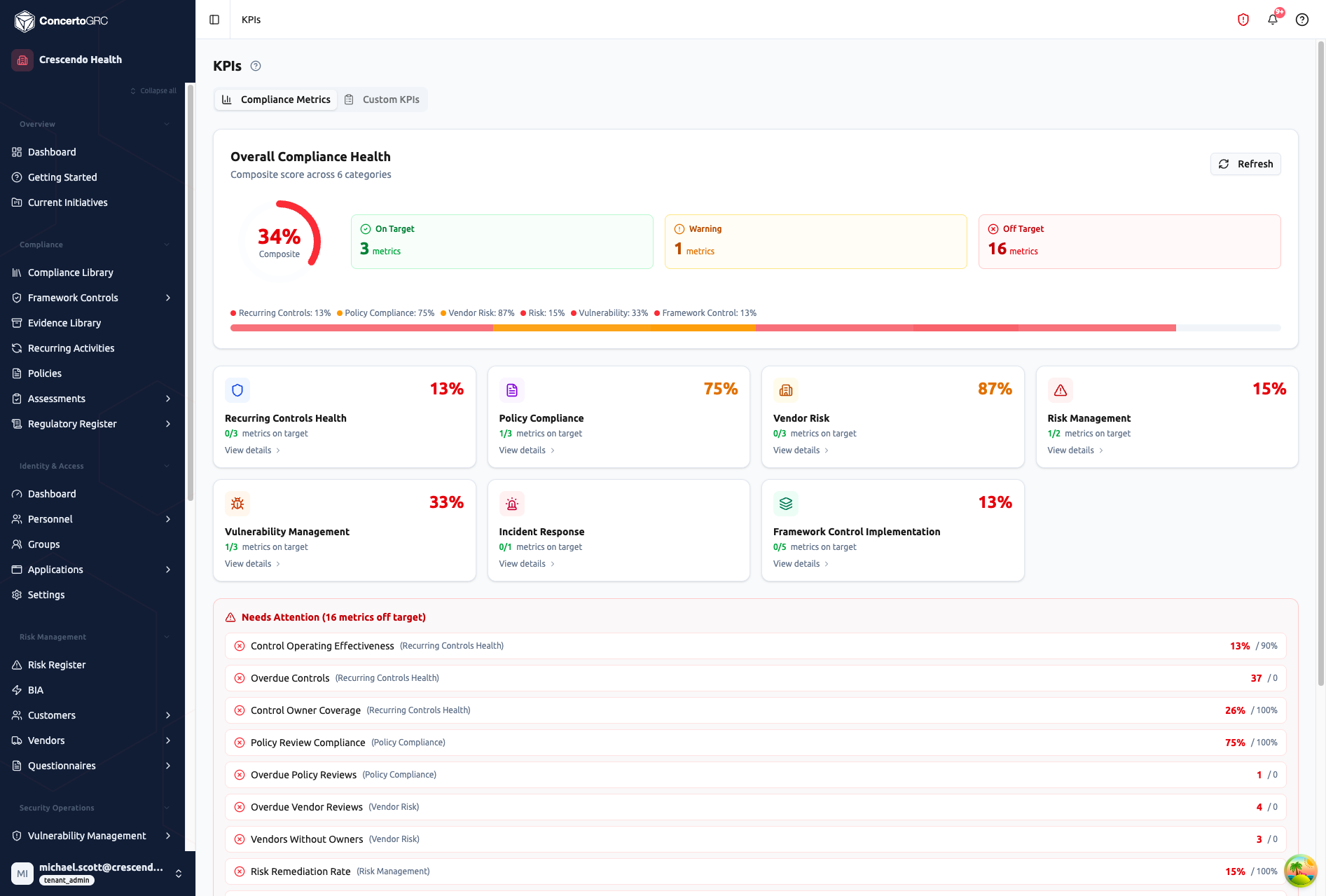
Compliance Metrics
The Compliance Metrics tab auto-calculates a composite compliance health score from live platform data across seven categories. No manual input required -- scores update as you work.
Overall Compliance Health
The header card shows:
- Composite Score -- Weighted average across all categories (0-100%)
- On Target -- Count of metrics meeting their target threshold
- Warning -- Count of metrics within tolerance of their target
- Off Target -- Count of metrics below target
- Category Bar -- Color-coded stacked bar showing each category's contribution
Click Refresh to recalculate scores from current data.
Metric Categories
Each category calculates a health percentage from its constituent metrics:
| Category | What It Measures |
|---|---|
| Recurring Controls Health | Control operating effectiveness, overdue controls, owner coverage |
| Policy Compliance | Policy acknowledgment rates, review compliance, overdue reviews |
| Vendor Risk | Vendor assessment completion, overdue reviews, owner coverage |
| Risk Management | Risk remediation rate, risk owner coverage |
| Vulnerability Management | Remediation rate, critical/high open findings, mean time to remediate |
| Incident Response | After-action review completion rate |
| Framework Control Implementation | Implementation rate per framework, controls without owners |
Click View details on any category card to expand its individual metrics.
Needs Attention
Below the category cards, the Needs Attention section lists all off-target metrics with:
- Metric name and parent category
- Current value (red) vs. target value
- Sorted by severity -- most critical gaps first
Threshold Bands
| Band | Color | Description |
|---|---|---|
| On Target | Green | Metric meets or exceeds target |
| Warning | Amber | Within 15% tolerance of target |
| Off Target | Red | Below target threshold |
Custom KPIs
The Custom KPIs tab lets you define and track manually managed indicators with quarterly progress monitoring.
Creating a KPI
- Navigate to Reporting --> KPIs --> Custom KPIs
- Click Create KPI
- Fill in name, owner, due date, and notes
KPI Fields
| Field | Description |
|---|---|
| Name | What is being measured |
| Owner | Person responsible for this KPI |
| Due Date | Target completion or review date |
| Notes | Description, targets, and measurement criteria |
| Remediation Notes | Action items when off-track |
| Q1-Q4 Status | Quarterly status indicators |
Quarterly Status Tracking
Each KPI has four quarterly status indicators. Click any quarter's status in the grid view to cycle through options:
| Status | Description |
|---|---|
| Not Started | Quarter hasn't begun or work not initiated |
| On Track | Meeting targets, no concerns |
| At Risk | Behind target, intervention needed |
| Missed | Failed to meet the target for this quarter |
| Completed | Successfully achieved the target |
| Not Applicable | KPI doesn't apply to this quarter |
Risk & Control Linking
Link KPIs to related records for bidirectional context:
- Risk Links -- Connect to risks this KPI helps monitor or mitigate
- Control Links -- Connect to recurring controls that contribute to this KPI
These links are visible from both sides -- view which KPIs track a risk's effectiveness from the risk detail, or see which controls feed into a KPI from its detail panel.