Coding Challenges
Coding Challenges are interactive secure coding exercises where employees identify and fix security vulnerabilities in code. Submissions are evaluated in an isolated AWS Lambda sandbox with automated test cases. Challenges are mapped to OWASP Top 10 categories and can be included in training campaigns alongside modules and policy acknowledgments.
Overview
Access from Security Operations > Training > Coding Challenges tab in the Training Library, or from the platform-level admin page at Platform Management > Coding Challenges.
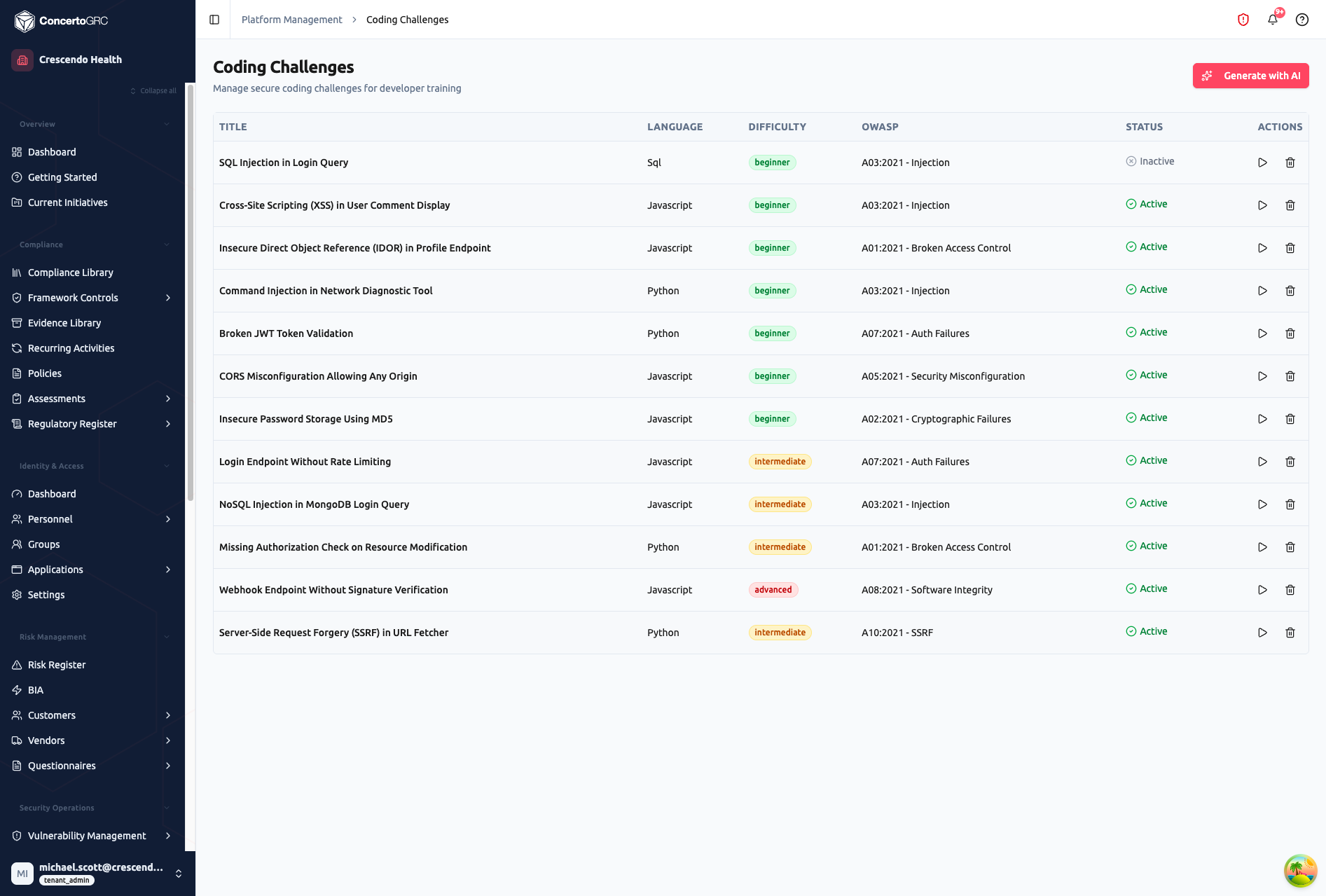
Challenge Table
| Column | Description |
|---|---|
| Title | Challenge name describing the vulnerability to fix |
| Language | Programming language (JavaScript, Python, or SQL) |
| Difficulty | Color-coded badge -- Beginner (green), Intermediate (amber), Advanced (red) |
| OWASP | OWASP Top 10 category the challenge addresses |
| Status | Active (green) or Inactive (gray) -- click to toggle |
| Actions | Preview (play icon) and Delete (trash icon) |
How It Works
- An employee encounters a coding challenge within a training campaign
- They're presented with starter code containing a security vulnerability
- They modify the code to fix the security issue
- Their submission is sent to an isolated AWS Lambda sandbox
- Automated test cases verify the fix is correct and secure
- AI feedback explains what they did right or wrong
- Results are recorded (pass/fail, attempts, time spent, score)
Challenge Fields
| Field | Description |
|---|---|
| Title | Challenge name |
| Description | What vulnerability to fix and why it matters |
| Language | JavaScript, Python, or SQL |
| Difficulty | Beginner, Intermediate, or Advanced |
| OWASP Category | Which OWASP Top 10 2021 category this addresses |
| Starter Code | Initial code containing the vulnerability |
| Solution Code | Reference solution (hidden from trainees) |
| Test Cases | Automated tests that verify correctness and security |
| Hints | Progressive hints from vague to specific |
| Required Fix | What the fix must accomplish to pass |
| Recommended Improvements | Optional enhancements shown after passing |
| Anti-Patterns | Common mistakes to flag in AI feedback |
| Time Limit | Maximum minutes allowed (default 15) |
| Max Attempts | Submissions before solution reveal is offered (default 4) |
Supported Languages
| Language | Vulnerability Focus |
|---|---|
| JavaScript | XSS prevention, input validation, authentication flaws, CORS misconfiguration, rate limiting |
| Python | Injection prevention, secure file handling, cryptography, SSRF, authorization checks |
| SQL | SQL injection prevention, parameterized queries |
OWASP Categories
Challenges are mapped to the OWASP Top 10 (2021):
| Category | Description |
|---|---|
| A01:2021 | Broken Access Control |
| A02:2021 | Cryptographic Failures |
| A03:2021 | Injection |
| A04:2021 | Insecure Design |
| A05:2021 | Security Misconfiguration |
| A06:2021 | Vulnerable Components |
| A07:2021 | Auth Failures |
| A08:2021 | Software Integrity |
| A09:2021 | Logging Failures |
| A10:2021 | SSRF |
Sandbox Evaluation
Submissions are evaluated in an isolated Lambda sandbox with no network access and limited resources:
JavaScript Sandbox
- Runs in a restricted Node.js
vmcontext - Provides safe globals (
Math,JSON,Array,Object, etc.) - Includes mock utilities for SQL and DOM-based challenges (
dbobject,documentmock) - Blocks
require,eval, andconsole - 5-second timeout per test case
Python Sandbox
- Spawns an isolated
python3process - Writes temp scripts with restricted permissions
- Automatic cleanup after execution
- 5-second timeout per test case
SQL Sandbox
- Uses in-memory SQLite database
- Setup phase creates tables and seeds data
- User code executed as SQL query
- Assertions verify query results in sandboxed JavaScript
Test Case Structure
Each challenge includes multiple test cases:
| Field | Description |
|---|---|
| Name | Test name for reporting (e.g., "Prevents SQL injection with single quotes") |
| Setup | Optional code to run before the user's code |
| Invoke | Expression to execute -- the result is captured |
| Assertion | Boolean expression that checks the result |
All tests must pass for the challenge to be marked as completed.
AI Features
AI Generation
Click Generate with AI to create a new challenge. Provide:
- Language -- Target programming language
- Difficulty -- Complexity level
- OWASP Category -- Which vulnerability type to test
- Context -- Optional organizational context (e.g., "healthcare application handling PHI")
- Specific Vulnerability -- Optional specific vulnerability to target
AI generates the full challenge including starter code, solution, test cases, hints, required fixes, and anti-patterns. Review and edit before saving.
AI Feedback
After each submission, AI provides targeted feedback:
- All tests pass -- Congratulates the trainee and optionally mentions a recommended improvement
- Tests fail -- States which test failed and gives one targeted hint without revealing the solution
- Final attempt -- Offers to reveal the reference solution
AI Coaching
Trainees can ask for coaching hints during a challenge (rate-limited to 10 requests per minute). The AI provides 2–3 sentence guidance that points in the right direction without giving away the solution.
Integration with Training
Coding challenges can be included in training campaigns alongside training modules and policy acknowledgments:
- Selected during campaign creation in the Challenges sub-tab
- Sequenced with other content types
- Progress tracked per challenge per assignment
- Scored toward the campaign's completion metrics
- Attempt history recorded (code submitted, test results, AI feedback, timestamp)
Trainee Experience
When a trainee opens a coding challenge:
- Challenge briefing -- Description of the vulnerability and what needs to be fixed
- Code editor -- Pre-loaded starter code with syntax highlighting
- Submit -- Sends code to the Lambda sandbox for evaluation
- Results -- Test case results (pass/fail per test) with AI feedback
- Hints -- Progressive hints available if struggling
- Timer -- Countdown based on the time limit
- Attempts -- Remaining attempt count displayed
- Solution reveal -- Available after max attempts exhausted