Integrations
Integrations connect ConcertoGRC to your existing tools and cloud providers, automating evidence collection, syncing personnel directories, importing security findings, and monitoring device compliance.
Overview
Access from Administration > Settings > Integrations in the sidebar.
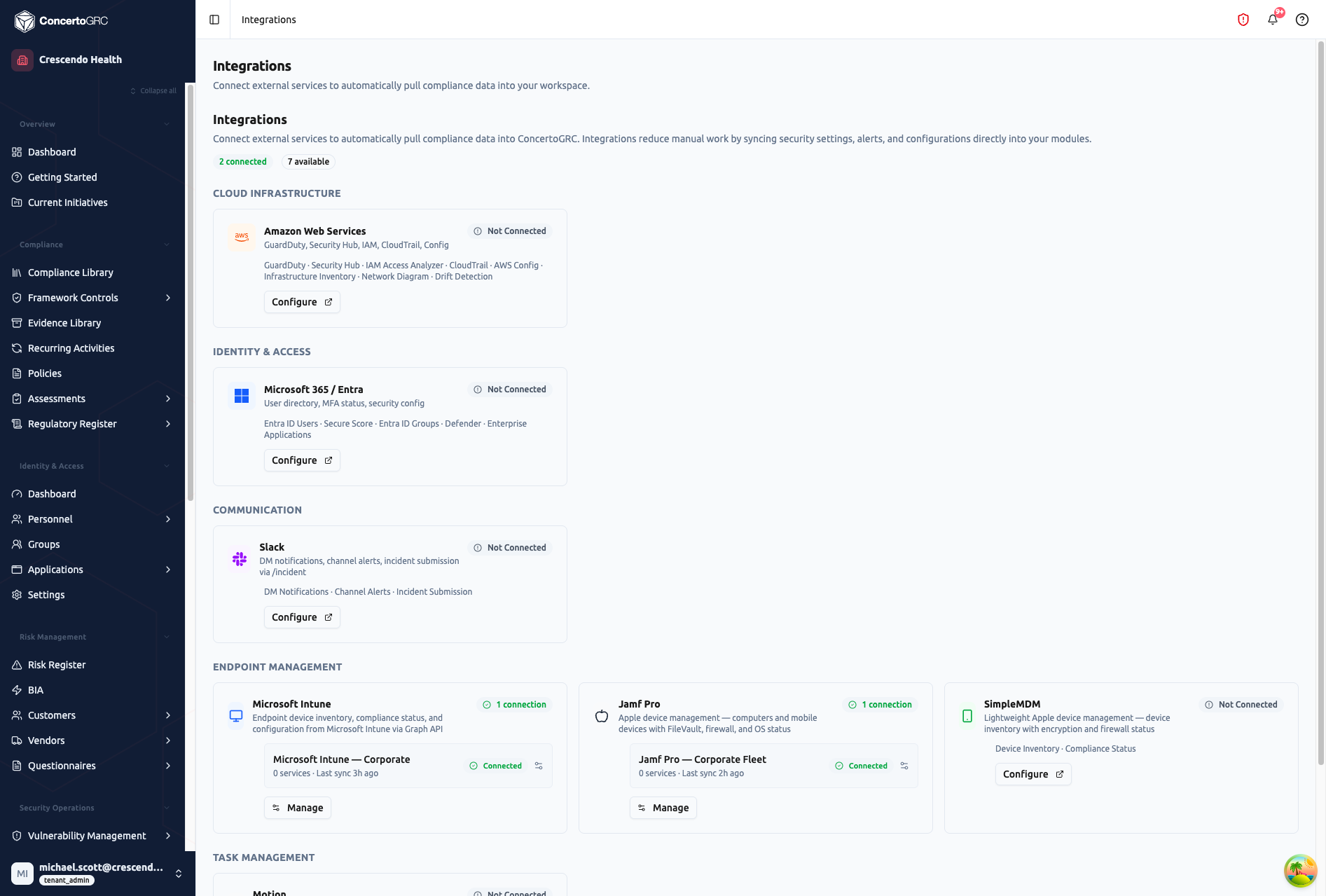
The page shows all available integrations organized by category with connection status badges. Integrations with active connections show their connection name, sync status, and last sync time.
Connection Statuses
| Status | Description |
|---|---|
| Connected | Active and syncing on schedule |
| Not Connected | Available but not yet configured |
| Error | Connection issue requiring attention |
| Expired | Credentials expired -- re-authentication needed |
Integration Categories
Cloud Infrastructure
| Integration | Services | Description |
|---|---|---|
| Amazon Web Services | GuardDuty, Security Hub, IAM, CloudTrail, AWS Config, Infrastructure Inventory, Network Diagram, Drift Detection | Security findings, IAM misconfigurations, infrastructure inventory, and evidence generation |
| Microsoft Azure | (catalog entry) | Azure cloud infrastructure monitoring (coming soon) |
| Google Cloud Platform | (catalog entry) | GCP infrastructure monitoring (coming soon) |
Identity & Access
| Integration | Services | Description |
|---|---|---|
| Microsoft 365 / Entra | Entra ID Users, Secure Score, Entra ID Groups, Defender, Enterprise Applications | User and group directory sync, MFA detection, and enterprise application inventory |
| Google Workspace | Users, Groups | User and group directory sync with domain-wide delegation |
Communication
| Integration | Services | Description |
|---|---|---|
| Slack | DM Notifications, Channel Alerts, Incident Submission | Direct message notifications, channel-based alerts, and incident submission via /incident command |
Endpoint Management
| Integration | Platforms | Description |
|---|---|---|
| Microsoft Intune | Windows, macOS, iOS, Android | Cross-platform device management via Microsoft Endpoint Manager |
| Jamf Pro | macOS, iOS | Enterprise Apple device management with FileVault, firewall, and OS status |
| SimpleMDM | macOS, iOS | Lightweight Apple device management with device inventory and compliance status |
Task Management
| Integration | Description |
|---|---|
| Motion | AI-powered task scheduling -- push compliance tasks to Motion and sync status back |
Source Control & CI/CD
| Integration | Description |
|---|---|
| GitHub | Repository monitoring and development activity tracking |
Connecting an Integration
Microsoft 365 (Entra ID)
- Navigate to Administration > Settings > Integrations
- Find Microsoft 365 and click Configure
- Click Grant Admin Consent -- opens a Microsoft consent dialog
- Sign in as a Global Admin or Privileged Role Admin
- Approve the requested permissions (read users, groups, directory)
- Once consent is granted, sync begins automatically on the next cycle
Google Workspace
- Navigate to Administration > Settings > Integrations
- Find Google Workspace and click Configure
- Follow the domain-wide delegation setup guide:
- Copy the provided Service Account email
- In Google Admin Console, go to Security → API Controls → Domain-wide Delegation
- Add the service account with the listed OAuth scopes
- Enter your primary Google Workspace domain
- Sync begins on the next cycle
AWS
- Navigate to Administration > Settings > Integrations
- Find AWS and click Configure
- Provide your AWS Account ID and an IAM role ARN with read permissions
- Select which services to enable (GuardDuty, Security Hub, IAM, etc.)
- The platform assumes the role to collect findings and generate evidence
Endpoint Management (Intune / Jamf / SimpleMDM)
- Navigate to Administration > Settings > Integrations
- Find your MDM provider and click Configure
- Provide API credentials (API key, OAuth client, or service account)
- Connection status is tested automatically
- Devices sync on the scheduled interval
Connected integrations show a Manage button for viewing connection details, triggering manual syncs, and adjusting settings.
Sync Behavior
Identity Sync (Microsoft / Google)
- Runs every 24 hours automatically
- Creates new Personnel records for new directory users
- Updates synced fields on existing records
- Detects MFA enrollment status
- Per-field sync policy: some fields are "IdP-managed" (auto-updated), others are "local" (manual edits preserved)
- Suspended users are marked for auto-escalation to Terminated after a configurable period
AWS Sync
- Runs every 6 hours automatically
- GuardDuty findings → Vulnerability Management (normalized, deduplicated, severity-mapped)
- IAM findings (stale keys, missing MFA, overly permissive policies) → Vulnerability Management
- Infrastructure inventory snapshots with drift detection
- Evidence reports auto-generate as PDF/CSV artifacts
Endpoint Sync
- Runs every 6 hours automatically
- Imports device inventory with attributes (OS, encryption, firewall, passcode)
- Updates device compliance status against your endpoint policies
- Creates compliance snapshots for trend tracking
Integration Mappings
Integrations can be pre-mapped to:
- Evidence Requests -- Findings auto-populate specific evidence
- Recurring Activities -- Integration data satisfies recurring compliance tasks
- Destination Modules -- Findings route to the appropriate module (Vulnerability Management, Evidence Library, etc.)
Mappings are configured at the platform level and inherited by your organization. You can customize inherited mappings in the integration detail panel.
Evidence Reports
Identity integrations automatically generate 5 compliance evidence reports:
- User Roster -- Complete list of active directory users
- MFA Status -- MFA enrollment status per user
- Admin Users -- Users with elevated/admin privileges
- Groups -- Group memberships
- Inactive Users -- Users who haven't logged in recently
These reports are stored in your Evidence Library and satisfy common SOC 2 and ISO 27001 evidence requirements.
Multiple Connections
Some integrations support multiple simultaneous connections. For example, you can connect multiple AWS accounts or MDM providers -- each with its own alias, credentials, and sync schedule. Each connection is tracked independently with its own status and last sync timestamp.