Employee Portal
The Employee Portal is a separate, employee-facing application where your team members can browse approved vendors, complete training assignments, acknowledge policies, and report security incidents. It uses email-based OTP authentication -- no separate password or Cognito account needed.
Administration
Configure the Employee Portal from Settings → Employee Portal in the main platform. The settings page has three tabs: General, Modules, and Access Log.
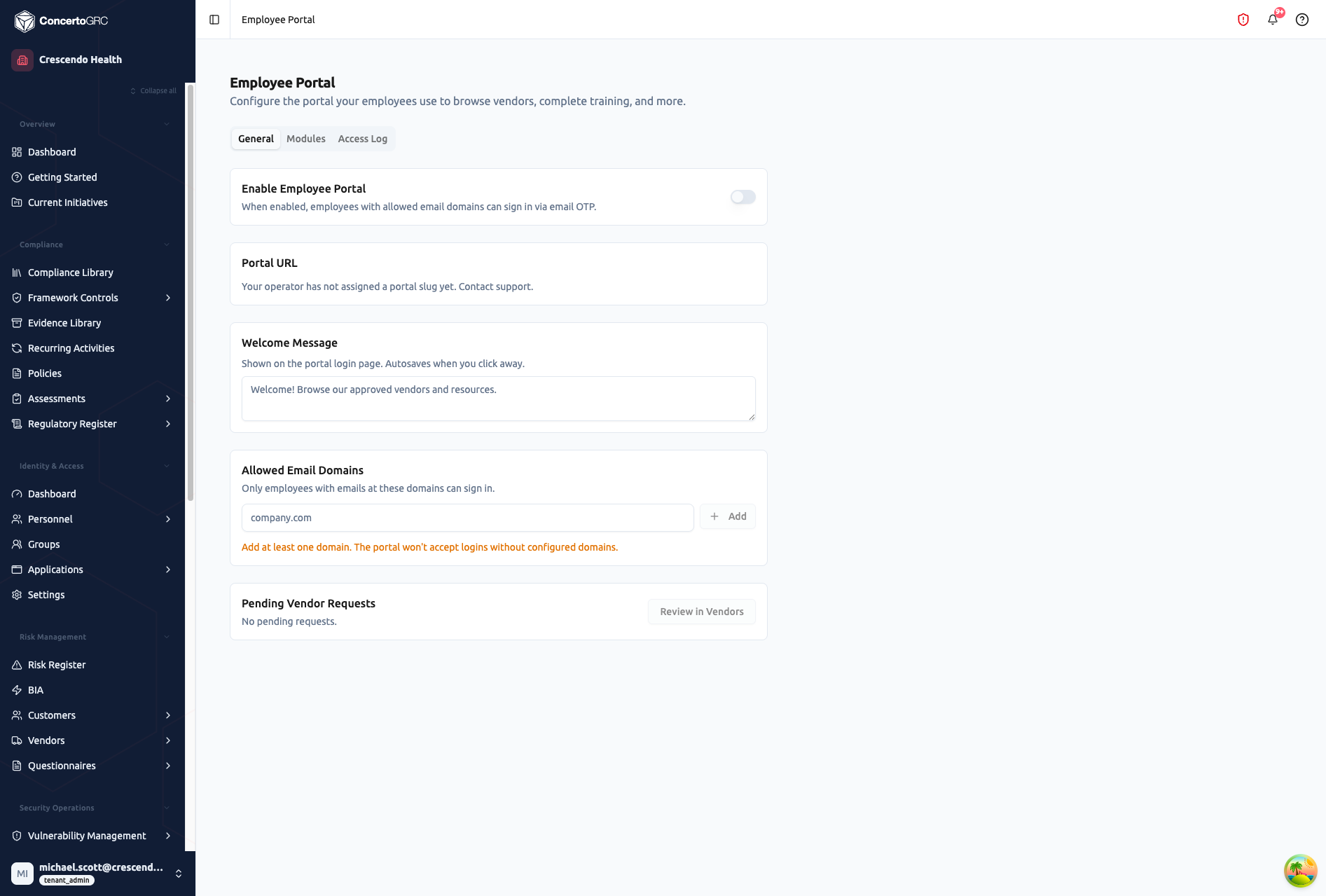
General Settings
| Setting | Description |
|---|---|
| Enable Employee Portal | Master on/off toggle for the portal |
| Portal URL | Unique URL path for your organization (assigned by operator) |
| Welcome Message | Custom text shown on the portal login page (autosaves on blur) |
| Allowed Email Domains | Which email domains can authenticate -- add at least one |
| Pending Vendor Requests | Quick view of employee vendor requests awaiting review |
Module Toggles
The Modules tab controls which sections employees see in the portal:
| Module | Description |
|---|---|
| Vendors | Browse approved vendor directory, view vendor details, submit new vendor requests |
| Training | View assigned training modules and completion status |
| Policies | Read and acknowledge organizational policies |
| Incidents | Report suspected security incidents through a guided wizard |
| Contact | Send messages to the compliance team |
Each module can be independently enabled or disabled.
Access Log
The Access Log tab shows portal activity:
- Who authenticated and when
- Which modules they accessed
- Session duration
Employee Experience
Authentication
The portal lives at a unique URL for your organization. Employees:
- Enter their work email address
- Receive a 6-digit OTP code via email
- Enter the code to start a 24-hour session
No password is needed -- authentication is email-based. Only email addresses matching your configured allowed domains can authenticate.
Recognized vs. Unrecognized Users
| User Type | Description | Access |
|---|---|---|
| Recognized | Email matches an AccessPersonnel record | Full portal access (all enabled modules) |
| Unrecognized | Valid domain but no personnel record | Can only browse the vendor directory |
Vendor Directory
Employees can:
- Search and filter approved vendors
- View vendor details (purpose, data types handled, security attestations)
- Submit requests for new vendor evaluations (routed to vendor management for review)
Training
View and complete security awareness training assignments:
- See assigned training modules and their status
- Launch training content directly from the portal
- Track completion progress
Policies
Review and acknowledge organizational policies:
- See published policies requiring acknowledgment
- Read policy content
- Sign/acknowledge each policy
- View acknowledgment history
Incidents
Report security incidents through a guided 5-step wizard:
- What type of incident?
- When did it happen?
- What happened (description)?
- What is the impact?
- Review and submit
Submitted incidents create records in the main Incident Response module for triage by your security team.
Contact
Submit questions or messages directly to the compliance team through a simple contact form.